
Download Health Pedometer – health pedometer, step tracker, fitness app, calorie counter, daily steps, weight loss, healthy lifestyle
Overview
Health Pedometer is a free Android application designed to support users in monitoring their daily physical activity and advancing their health and fitness goals. Developed by 모닝, the app belongs to the Lifestyle category, specifically targeting the Health & Fitness niche. Its primary function is to serve as a reliable step tracker, enabling users to count their daily steps with precision. By leveraging built-in device sensors rather than relying on GPS, the app minimizes battery consumption while maintaining consistent tracking accuracy. This makes it suitable for long-term use throughout the day without impacting device performance.
The app is intended for individuals seeking to adopt or maintain a more active lifestyle, including fitness beginners, weight management enthusiasts, and those aiming to increase daily movement. It supports real-world usage scenarios such as walking to work, morning jogs, or simply tracking steps during daily routines. With features like personal records, historical data visualization, and real-time calorie burn estimation, Health Pedometer offers a holistic view of physical activity patterns over time. The developer did not provide additional details about the company background or broader product ecosystem.
Key Features & Capabilities
- Step Tracking via Device Sensors: Uses hardware accelerometers and gyroscopes to count steps without GPS, reducing battery usage and ensuring continuous tracking throughout the day.
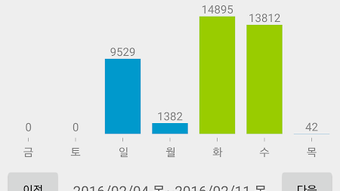
- Daily, Weekly, and Monthly Progress Graphs: Visualizes step data over different timeframes, helping users identify trends and stay motivated with visual feedback.
- Real-Time Calorie Burn Estimation: Calculates approximate daily calorie expenditure based on step count and user input, aiding in weight management and fitness planning.
- Personal Records and Statistics: Tracks best performance days, average steps over the past seven days, and monthly totals to encourage consistent progress.
- Diet Tips and Health Knowledge: Offers general wellness advice and nutritional guidance to complement physical activity and support long-term healthy habits.
These capabilities are designed to help users stay engaged with their fitness journey. For example, viewing weekly graphs can reveal patterns in activity levels, while calorie burn data supports informed dietary decisions. The integration of diet tips with step tracking creates a dual-purpose tool that promotes both movement and mindful eating. The developer did not specify additional features beyond those listed.
User Interface, Workflow & Performance
The app presents a clean and intuitive interface, prioritizing ease of access to core functions. Users can view their current step count, daily goals, and calorie burn at a glance, with minimal navigation required. Navigation is straightforward, likely relying on a bottom tab bar or swipe-based menu common in Android lifestyle apps. The workflow emphasizes simplicity—users open the app, check progress, and receive immediate feedback, making it ideal for quick status checks during the day.
Performance details were not specified by the developer. However, given its lightweight size of 12.4 MB and sensor-based operation, the app is expected to run efficiently on most modern Android devices. The developer did not provide information on CPU or RAM usage, stability under prolonged use, or background behavior. General software behavior patterns suggest it operates in the background without significant impact on device responsiveness. Battery consumption is likely low due to the avoidance of GPS.
Compatibility & System Requirements
Health Pedometer is designed for Android devices and is compatible with the operating system version specified in the release data. The app has a file size of 12.4 MB, indicating a lightweight footprint suitable for devices with limited storage. The exact minimum Android version required was not listed, nor were specific hardware requirements such as processor speed or RAM capacity. The developer did not provide detailed system compatibility information.
Users should ensure their device supports motion sensors (accelerometer and gyroscope) for full functionality. While not explicitly stated, such sensors are standard on most Android smartphones released in the last decade. Compatibility with older or low-end devices cannot be confirmed without further details. The app does not appear to require external hardware or internet connectivity for basic step tracking, though some features may require an active connection.
Pros and Cons
Pros
- Free to download and use with no in-app purchases mentioned
- Lightweight design at only 12.4 MB
- Uses device sensors instead of GPS, reducing battery drain
- Intuitive interface suitable for users of all experience levels
- Provides visual progress tracking through daily, weekly, and monthly graphs
- Includes diet tips and health advice to support holistic wellness
Cons
- Exact system requirements and minimum Android version not specified
- Performance and resource usage details were not provided
- Limited information about background operation and data privacy
- Offline functionality may be restricted if certain features require internet access
- No mention of cloud sync or cross-device data backup
FAQ Section
Is Health Pedometer compatible with all Android devices?
The app is designed for Android, but specific compatibility details such as minimum OS version or hardware requirements were not provided by the developer.
Is the app safe to use and secure?
While the app is free and available through official channels, no information was shared regarding data encryption, privacy policies, or third-party data sharing practices.
Does Health Pedometer require an internet connection?
Basic step tracking functions can operate offline. However, some features like diet tips and real-time data updates may require an internet connection.
How often does the app update?
The app was last released on May 10, 2023. The developer did not provide information about update frequency or release schedule.
Can I use Health Pedometer without creating an account?
There is no indication that user accounts or registration are required. The app appears to function as a standalone tool without mandatory sign-in.
Final Thoughts
Health Pedometer offers a straightforward, no-frills approach to step tracking and fitness monitoring. Its sensor-based design ensures efficient battery usage, while its clean interface supports easy navigation and immediate access to key metrics. The inclusion of calorie estimation and general health tips adds value beyond simple step counting, making it a useful tool for individuals focused on daily movement and lifestyle improvement. Although detailed system requirements and performance data are missing, the app’s lightweight nature and free availability make it accessible to a broad audience.
For users seeking a reliable, low-impact fitness companion to support their health journey, Health Pedometer presents a compelling option. It is particularly well-suited for those who prefer simplicity and do not require advanced analytics or cloud synchronization. The app’s focus on core functionality—step tracking, progress visualization, and wellness guidance—aligns with the needs of everyday users aiming to stay active and healthy.
Download Health Pedometer now





.png)

